
AI assistants are becoming common. But answering questions is only a small part of what an AI system can do.
With IuVeAI Connect Console, we are building something different: a desktop environment where AI can work directly with a local workspace, understand project context, assist with development, inspect the system, and interact with real tools — while keeping control and visibility in the hands of the user.
The latest version of the IuVe Connect Agent Console — currently in Beta — brings several important pieces of this vision together in one interface.
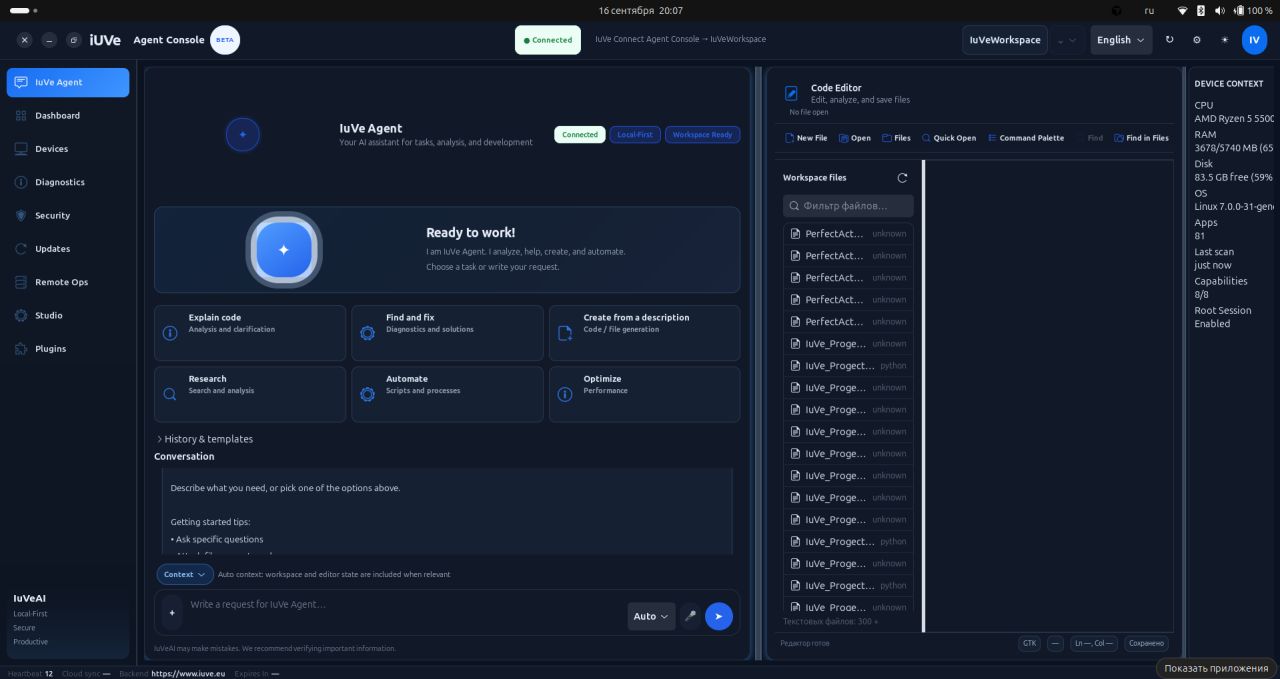
The main workspace combines IuVe Agent with an integrated code editor. The Agent can work with the selected project context and provides direct starting points for tasks such as explaining code, finding and fixing problems, creating from a description, researching, automating processes, and optimizing existing work.
Three states visible directly in the interface describe an important part of the architecture:
Connected. Local-First. Workspace Ready.
The goal is not to treat AI as a separate browser tab. The Agent becomes part of the working environment.
AI + Code in the same workspace
The video demonstrates the IuVe Agent alongside the integrated Code Editor, including open project files, source code, file navigation and diagnostics.
This creates a much more practical workflow: the developer does not need to continuously copy code between an IDE and an AI conversation. Workspace context can become part of the Agent's working environment.
The Agent chat itself is designed for goal-oriented work. A user describes what needs to be achieved, while the Console provides the surrounding context required to execute or assist with that task.
A guided environment, not just another settings panel
A new guided onboarding flow introduces the core concepts of the Console step by step.
It explains the workspace, Agent chat, security model, plugins and other parts of the environment directly inside the application.
This matters because powerful AI agents require more than a prompt box. Users need to understand where the Agent is operating, which resources it can access, and what capabilities are currently active.
Security and device trust remain visible
The Console includes a dedicated Security area where device identity, connection state, trust and permissions can be reviewed.
Instead of hiding these details behind the AI layer, the objective is to make them visible and understandable.
An autonomous agent should not become an invisible black box.
Users should be able to see the relationship between the AI, their device and the permissions granted to it.
Diagnostics that show what the Agent is actually doing
The Device Health and Diagnostics section provides another important layer of transparency.
The video shows connection status, device trust, heartbeat information, logs and a Command Action Log containing real Agent operations.
This gives the system an auditable operational layer.
When the Agent reads files, executes an allowed action, performs diagnostics or completes a task, those operations can be surfaced instead of disappearing behind a generic “AI is working” animation.
A modular plugin architecture
The Console also includes a dedicated Plugins section.
Capabilities visible in the current build include integrations around areas such as:
Git, debugging, Remote SSH, verification and OpenCode.
Each plugin exposes its own state and permissions.
This modular architecture is important for the future of IuVeAI: the Agent does not need to become one enormous monolithic application. Capabilities can be added as controlled modules while the Console remains the central environment for interaction, permissions and execution.
Local-First as a design principle
One of the most important indicators in the interface is still Local-First.
For many development and automation tasks, local context matters: project files, development tools, system state and device resources live on the user's machine.
IuVe Connect is being designed as the bridge between that local environment and the broader IuVeAI ecosystem.
Cloud intelligence can still have a role where appropriate, but local execution and local context should not be treated as an afterthought.
Where we are going
The direction is becoming increasingly clear.
The next generation of AI software will not be defined only by better chat responses.
It will be defined by systems that can:
understand context, work with tools, interact with real environments, execute controlled actions, expose what they are doing, and remain manageable by the user.
That is the direction behind IuVeAI Connect Console.
Not simply an AI chat.
Not simply an editor.
Not simply a desktop agent.
It is becoming the operational workspace between the user, AI, local devices, development tools and the IuVe ecosystem.
And this Beta is another step toward that architecture.
IuVeAI — moving AI from conversation to real work.
#IuVeAI #IuVe #IuVeConnect #AIAgent #AgenticAI #LocalFirst #ArtificialIntelligence #AIEngineering #DeveloperTools #CodingAI #Automation #SoftwareDevelopment #OpenSource #FutureOfWork #AIWorkspace #DesktopAI
Research take on the open question: «But answering questions is only a small part of what an AI system can do.». If this is thin next cycle, better a NOOP than a confident rewrite of «IuVeAI Connect Console — From AI Chat to an AI-Pow». Also worth verifying: The latest version of the IuVe Connect Agent Console — currently in Beta — brings several important pieces of this vision together in one interface.
1 like